Sign Up

Sign Up to our social questions and Answers Engine to ask questions, answer people’s questions, and connect with other people.

Have an account? Sign In

Have an account? Sign In Now

Sign In

Login to our social questions & Answers Engine to ask questions answer people’s questions & connect with other people.

Sign Up Here

Forgot Password?

Don't have account, Sign Up Here

Forgot Password

Lost your password? Please enter your email address. You will receive a link and will create a new password via email.

Have an account? Sign In Now

You must login to ask a question.

Forgot Password?

Need An Account, Sign Up Here

Please briefly explain why you feel this question should be reported.

Please briefly explain why you feel this answer should be reported.

Please briefly explain why you feel this user should be reported.

Sign InSign Up

Deepak Baghel – Smart Coding, Real Solutions

Deepak Baghel – Smart Coding, Real Solutions Logo Deepak Baghel – Smart Coding, Real Solutions Logo
Search
Ask A Question

Mobile menu

Close
Ask A Question
  • Post
  • Categories
    • MS SQL
    • C#
    • CMD
    • WordPress
  • Groups page
  • News
MS SQL

MS SQL

Public group
169Views
0Users
0Posts
Home/ Groups/MS SQL

Group rules

How to Create Indexes in SQL Server How to Create Indexes in SQL Server for Better Performance Indexes play a critical role See more

How to Create Indexes in SQL Server

How to Create Indexes in SQL Server for Better Performance

Indexes play a critical role in improving query performance in SQL Server.
A well-designed index can drastically reduce query execution time, lower CPU usage,
and enhance overall database efficiency. This post explains how to create SQL Server indexes,
why they matter, and how to apply best practices in real-world environments.

Why Indexes Are Important in SQL Server

An index is a data structure that helps SQL Server quickly locate rows in a table
without scanning the entire dataset. Proper indexing is essential for scalable and
high-performance database systems.

  • Improves SELECT query performance
  • Reduces disk I/O and CPU usage
  • Speeds up JOIN, WHERE, and ORDER BY operations
  • Helps SQL Server optimize execution plans
  • Supports high-volume transactional systems

SQL Server Index Creation Example

Below is a practical example of creating a nonclustered index in SQL Server
to optimize queries that filter data using the CustomerID column.


 -- Create a nonclustered index on the CustomerID column
 CREATE NONCLUSTERED INDEX IX_Orders_CustomerID
 ON dbo.Orders (CustomerID)
 INCLUDE (OrderDate, TotalAmount);
  

Step-by-Step Explanation

  • CREATE NONCLUSTERED INDEX defines a nonclustered index structure.
  • IX_Orders_CustomerID is a meaningful index name that follows naming conventions.
  • dbo.Orders specifies the target table.
  • (CustomerID) is the key column used for search and filtering.
  • INCLUDE adds non-key columns to avoid key lookups and improve query coverage.

Best Practices and Notes

  • Create indexes based on actual query patterns, not assumptions.
  • Avoid over-indexing as it increases INSERT, UPDATE, and DELETE overhead.
  • Regularly review index usage using sys.dm_db_index_usage_stats.
  • Maintain indexes with REBUILD or REORGANIZE to reduce fragmentation.
  • Follow official guidance from Microsoft:

    SQL Server Indexes Overview
  • Test index changes in a non-production environment before deployment.
How to Fill Missing Values in SQL Server

How to Fill Missing Values in SQL Server Using LAST_VALUE IGNORE NULLS

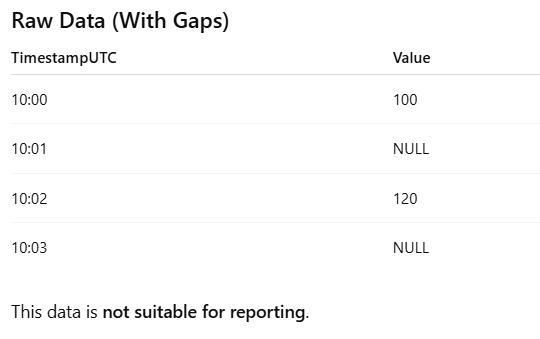
When working with time-based data such as energy readings, sensor data, machine logs, or server metrics, missing values (NULL) are very common.
Unfortunately, these missing values can break reports, graphs, and calculations.

SQL Server provides a clean and powerful solution using window functions:

LAST_VALUE(Value) IGNORE NULLS
OVER (
ORDER BY TimestampUTC
ROWS BETWEEN UNBOUNDED PRECEDING AND CURRENT ROW
)

In this blog, we’ll explain what this means, why it’s useful, and how it works with a simple example.

What This SQL Expression Does (In Simple Words)

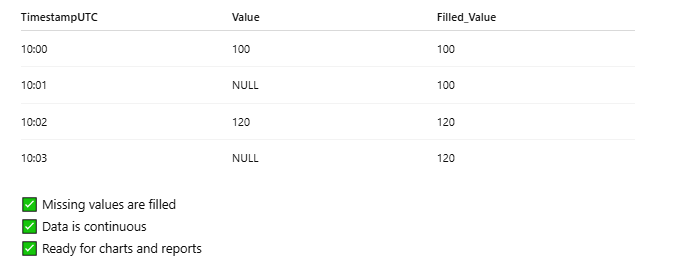
It looks at previous rows and reuses the last available value whenever the current value is missing.

  Let’s assume we have a table storing readings every minute.

SQL Query Using LAST_VALUE IGNORE NULLS

 SELECT
 TimestampUTC,
 Value,
 LAST_VALUE(Value) IGNORE NULLS
 OVER (
 ORDER BY TimestampUTC
 ROWS BETWEEN UNBOUNDED PRECEDING AND CURRENT ROW
 ) AS Filled_Value
 FROM DummyEnergyData;

  Result After Applying the Logic

How It Works (Human Explanation)

LAST_VALUE(Value)

Returns the most recent value in the defined window.

IGNORE NULLS

Skips missing values and looks backward until a valid value is found.

ORDER BY TimestampUTC

Ensures data is processed in time order.

ROWS BETWEEN UNBOUNDED PRECEDING AND CURRENT ROW

Means:

“Start from the first record and keep checking up to the current row.”

Full backups of all databases in the local named instance of SQLEXPRESS by using Windows Authentication

Example 1: Full backups of all databases in the local named instance of SQLEXPRESS by using Windows Authentication

sqlcmd -S .\SQLEXPRESS -E -Q "EXEC sp_BackupDatabases @backupLocation='D:\SQLBackups\', @backupType='F'"

Example 2: Differential backups of all databases in the local named instance of SQLEXPRESS by using a SQLLogin and its password

sqlcmd -U <YourSQLLogin> -P <StrongPassword> -S .\SQLEXPRESS -Q "EXEC sp_BackupDatabases @backupLocation ='D:\SQLBackups', @BackupType='D'"

Example 3: Log backups of all databases in the local named instance of SQLEXPRESS by using Windows Authentication

sqlcmd -S .\SQLEXPRESS -E -Q "EXEC sp_BackupDatabases @backupLocation='D:\SQLBackups\',@backupType='L'"

Example 4: Full backups of the database USERDB in the local named instance of SQLEXPRESS by using Windows Authentication

sqlcmd -S .\SQLEXPRESS -E -Q "EXEC sp_BackupDatabases @backupLocation='D:\SQLBackups\',@backupType='F'"

Create a Full Database Backup MS Sql Sever Script

How to create a scheduled backup in SQL Express

You have to follow these four steps to back up your SQL Server databases by using Windows Task Scheduler:

Step 1: Create a stored procedure to back up your databases

Connect to your SQL express instance and create sp_BackupDatabases stored procedure in your master database using the script at the following location:

Step 2: Download the SQLCMD client utility

The sqlcmd utility lets you enter Transact-SQL statements, system procedures, and script files. In SQL Server 2014 and lower versions, the utility is shipped as part of the product. Starting with SQL Server 2016, sqlcmd utility is offered as a separate download. For more information, review sqlcmd Utility.

USE [master]  
GO  


SET ANSI_NULLS ON  
GO  
SET QUOTED_IDENTIFIER ON  
GO  


CREATE PROCEDURE [dbo].[sp_BackupDatabases]   
            @databaseName sysname = null, 
            @backupType CHAR(1), 
            @backupLocation nvarchar(200)  
AS  
       SET NOCOUNT ON;  
            DECLARE @DBs TABLE 
            ( 
                  ID int IDENTITY PRIMARY KEY, 
                  DBNAME nvarchar(500) 
            ) 
            
            INSERT INTO @DBs (DBNAME) 
            SELECT Name FROM master.sys.databases 
            where state=0 
            AND name= ISNULL(@databaseName ,name)
            ORDER BY Name
           
            IF @backupType='F' 
                  BEGIN 
                  DELETE @DBs where DBNAME IN ('tempdb','Northwind','pubs','AdventureWorks') 
                  END 
            ELSE IF @backupType='D' 
                  BEGIN 
                  DELETE @DBs where DBNAME IN ('tempdb','Northwind','pubs','master','AdventureWorks') 
                  END 
            ELSE IF @backupType='L' 
                  BEGIN 
                  DELETE @DBs where DBNAME IN ('tempdb','Northwind','pubs','master','AdventureWorks') 
                  END 
            ELSE 
                  BEGIN 
                  RETURN 
                  END 
           
            DECLARE @BackupName nvarchar(100) 
            DECLARE @BackupFile nvarchar(300) 
            DECLARE @DBNAME nvarchar(300) 
            DECLARE @sqlCommand NVARCHAR(1000)  
        DECLARE @dateTime NVARCHAR(20) 
            DECLARE @Loop int                   
           
            SELECT @Loop = min(ID) FROM @DBs 
      WHILE @Loop IS NOT NULL 
      BEGIN 


      SET @DBNAME = '['+(SELECT DBNAME FROM @DBs WHERE ID = @Loop)+']' 


      SET @dateTime = REPLACE(CONVERT(VARCHAR, GETDATE(),101),'/','') + '_' +  REPLACE(CONVERT(VARCHAR, GETDATE(),108),':','')   


      IF @backupType = 'F' 
            SET @BackupFile = @backupLocation+REPLACE(REPLACE(@DBNAME, '[',''),']','')+ '_FULL_'+ @dateTime+ '.BAK' 
      ELSE IF @backupType = 'D' 
            SET @BackupFile = @backupLocation+REPLACE(REPLACE(@DBNAME, '[',''),']','')+ '_DIFF_'+ @dateTime+ '.BAK' 
      ELSE IF @backupType = 'L' 
            SET @BackupFile = @backupLocation+REPLACE(REPLACE(@DBNAME, '[',''),']','')+ '_LOG_'+ @dateTime+ '.TRN' 


      IF @backupType = 'F' 
            SET @BackupName = REPLACE(REPLACE(@DBNAME,'[',''),']','') +' full backup for '+ @dateTime 
      IF @backupType = 'D' 
            SET @BackupName = REPLACE(REPLACE(@DBNAME,'[',''),']','') +' differential backup for '+ @dateTime 
      IF @backupType = 'L' 
            SET @BackupName = REPLACE(REPLACE(@DBNAME,'[',''),']','') +' log backup for '+ @dateTime 


       IF @backupType = 'F'  
                  BEGIN 
               SET @sqlCommand = 'BACKUP DATABASE ' +@DBNAME+  ' TO DISK = '''+@BackupFile+ ''' WITH INIT, NAME= ''' +@BackupName+''', NOSKIP, NOFORMAT' 
                  END 
       IF @backupType = 'D' 
                  BEGIN 
               SET @sqlCommand = 'BACKUP DATABASE ' +@DBNAME+  ' TO DISK = '''+@BackupFile+ ''' WITH DIFFERENTIAL, INIT, NAME= ''' +@BackupName+''', NOSKIP, NOFORMAT'         
                  END 
       IF @backupType = 'L'  
                  BEGIN 
               SET @sqlCommand = 'BACKUP LOG ' +@DBNAME+  ' TO DISK = '''+@BackupFile+ ''' WITH INIT, NAME= ''' +@BackupName+''', NOSKIP, NOFORMAT'         
                  END 


       EXEC(@sqlCommand) 


SELECT @Loop = min(ID) FROM @DBs where ID>@Loop 
END 

Step 3: Create a batch file using a text editor

In a text editor, create a batch file that is named Sqlbackup.bat, and then copy the text from one of the following examples into that file, depending on your scenario:

  • All the scenarios below use D:\SQLBackups as a place holder. The script needs to be adjusted to the right drive and Backup folder location in your environment.
  • If you are using SQL authentication, ensure that access to the folder is restricted to authorized users as the passwords are stored in clear text.

Clear The SQL Server transaction log

Managing SQL Server Transaction Logs: A Step-by-Step Guide

Effective management of transaction logs is crucial for maintaining the performance and storage efficiency of your SQL Server databases. In this post, we’ll walk through a practical example using the AdventureWorks2008R2 database, covering how to change the recovery model, truncate the log, and shrink the log file.

Why Manage Transaction Logs?

Transaction logs are essential for:

  • Ensuring data integrity and recovery.
  • Tracking all transactions and database modifications.
  • Controlling the amount of disk space consumed.

However, these logs can grow significantly, especially under a FULL recovery model, leading to storage challenges.

USE AdventureWorks2008R2;
GO
-- Truncate the log by changing the database recovery model to SIMPLE.
ALTER DATABASE AdventureWorks2008R2
SET RECOVERY SIMPLE;
GO explain in points
-- Shrink the truncated log file to 1 MB.
DBCC SHRINKFILE (AdventureWorks2008R2_Log, 1);
GO
-- Reset the database recovery model.
ALTER DATABASE AdventureWorks2008R2
SET RECOVERY FULL;
GO
  • SIMPLE Model: Truncates log and frees space; no point-in-time recovery.
  • Shrink Operation: Reduces the log file size on disk.
  • FULL Model: Allows for comprehensive recovery options; log management is necessary.
 See less

There are no posts yet.

Explore

  • Post
  • Categories
    • MS SQL
    • C#
    • CMD
    • WordPress
  • Groups page
  • News

Footer

About Us – Website Overview | Privacy Policy | Terms of Service – Website Usage Rules | Disclaimer – Content Accuracy & Liability

© 2024 Deepak Baghel All Rights Reserved.