
How to Fill Missing Values in SQL Server Using LAST_VALUE IGNORE NULLS
When working with time-based data such as energy readings, sensor data, machine logs, or server metrics, missing values (NULL) are very common.
Unfortunately, these missing values can break reports, graphs, and calculations.
SQL Server provides a clean and powerful solution using window functions:
LAST_VALUE(Value) IGNORE NULLS
OVER (
ORDER BY TimestampUTC
ROWS BETWEEN UNBOUNDED PRECEDING AND CURRENT ROW
)
In this blog, we’ll explain what this means, why it’s useful, and how it works with a simple example.
What This SQL Expression Does (In Simple Words)
It looks at previous rows and reuses the last available value whenever the current value is missing.
Let’s assume we have a table storing readings every minute.
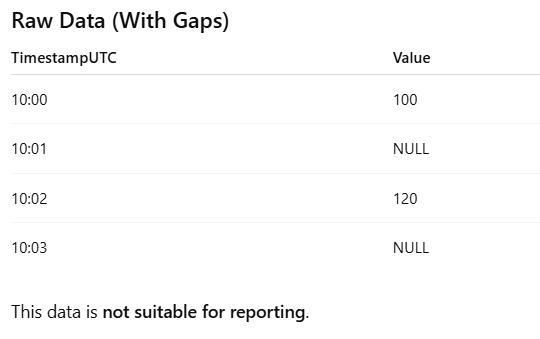
SQL Query Using LAST_VALUE IGNORE NULLS
 SELECT
 TimestampUTC,
 Value,
 LAST_VALUE(Value) IGNORE NULLS
 OVER (
 ORDER BY TimestampUTC
 ROWS BETWEEN UNBOUNDED PRECEDING AND CURRENT ROW
 ) AS Filled_Value
 FROM DummyEnergyData;
Result After Applying the Logic
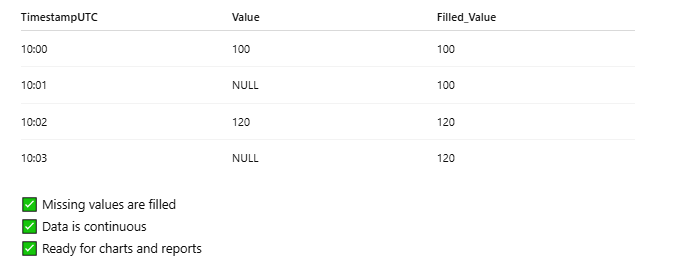
How It Works (Human Explanation)
LAST_VALUE(Value)
Returns the most recent value in the defined window.
IGNORE NULLS
Skips missing values and looks backward until a valid value is found.
ORDER BY TimestampUTC
Ensures data is processed in time order.
ROWS BETWEEN UNBOUNDED PRECEDING AND CURRENT ROW
Means:
“Start from the first record and keep checking up to the current row.”
Leave a comment